
Organizations, groups and API access
An organization can arrange its work into groups. A group is a shared working space for members, vehicles and the business records they are allowed to access. Members do not each get a separate copy of a vehicle or inspection. Their effective actions still depend on their role, permissions and the group’s settings.
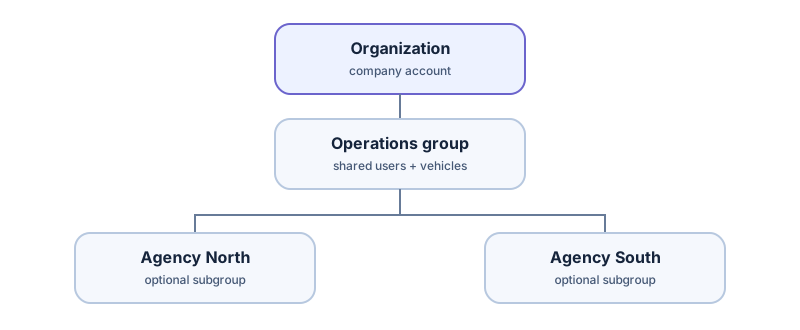
A practical example
Section titled “A practical example”Imagine a rental company with a head office and two agencies:
| Space | Typical use | Who works there |
|---|---|---|
| Operations group | Central team and shared oversight | Administrators and managers |
| Agency North subgroup | Local vehicles and inspections | North agency staff |
| Agency South subgroup | Local vehicles and inspections | South agency staff |
Subgroups are optional. A small rental business can use one group for everyone. A multi-site business can use the hierarchy to organize teams and access. Hierarchy and role rules decide whether a parent or sibling can see or change a particular resource; membership alone should not be interpreted as unrestricted access to every descendant. A user may have a membership and permissions that differ between spaces.
What an API key represents
Section titled “What an API key represents”An administrator creates one or more named keys for a specific group in API & integrations. Keys can have permissions and an expiry, and can be revoked or rotated. The key identifies a software integration acting for that group; it is not a personal login and is not automatically an organization-wide master key. A parent-group key must not be assumed to access every subgroup. If separate agencies need isolated integrations, plan one key and data flow per intended group and verify the resulting permissions.
The current public API scopes external IDs and resources to the authenticated group. For example, RES-1042 in one group is distinct from RES-1042 in another. Your integration should persist the group it used alongside its external ID and returned public ID.
A link does not grant membership
Section titled “A link does not grant membership”When the API creates an inspection, it can return a short-lived launch_url. The URL locates the inspection, but an employee still signs in to TrakarIA and must have access to the owning group and action. Never send the group API key to a browser or embed it in the link. See authentication and access and integration models.